
The work OS for AI-native agencies and product teams
Your tickets, your hours, your agents. One board.
Tengu runs your dev loop from the ticket: Claude Code builds it, QA checks it, you ship it. Time, budgets and payroll come along, without screenshots. Bring your work over from ClickUp, Linear or Jira, comments and attachments included.
Claude Code runs on your own Claude account, and agents are never a seat. Paid plans from $7 per seat a month on the annual plan.
Works with the tools your team already runs
- ClickUpImport
- LinearImport
- JiraImport
- GitHubPull requests
- Claude CodeAgents
- SlackTengu Bot
The dev loop
From ticket to live, without leaving the quest
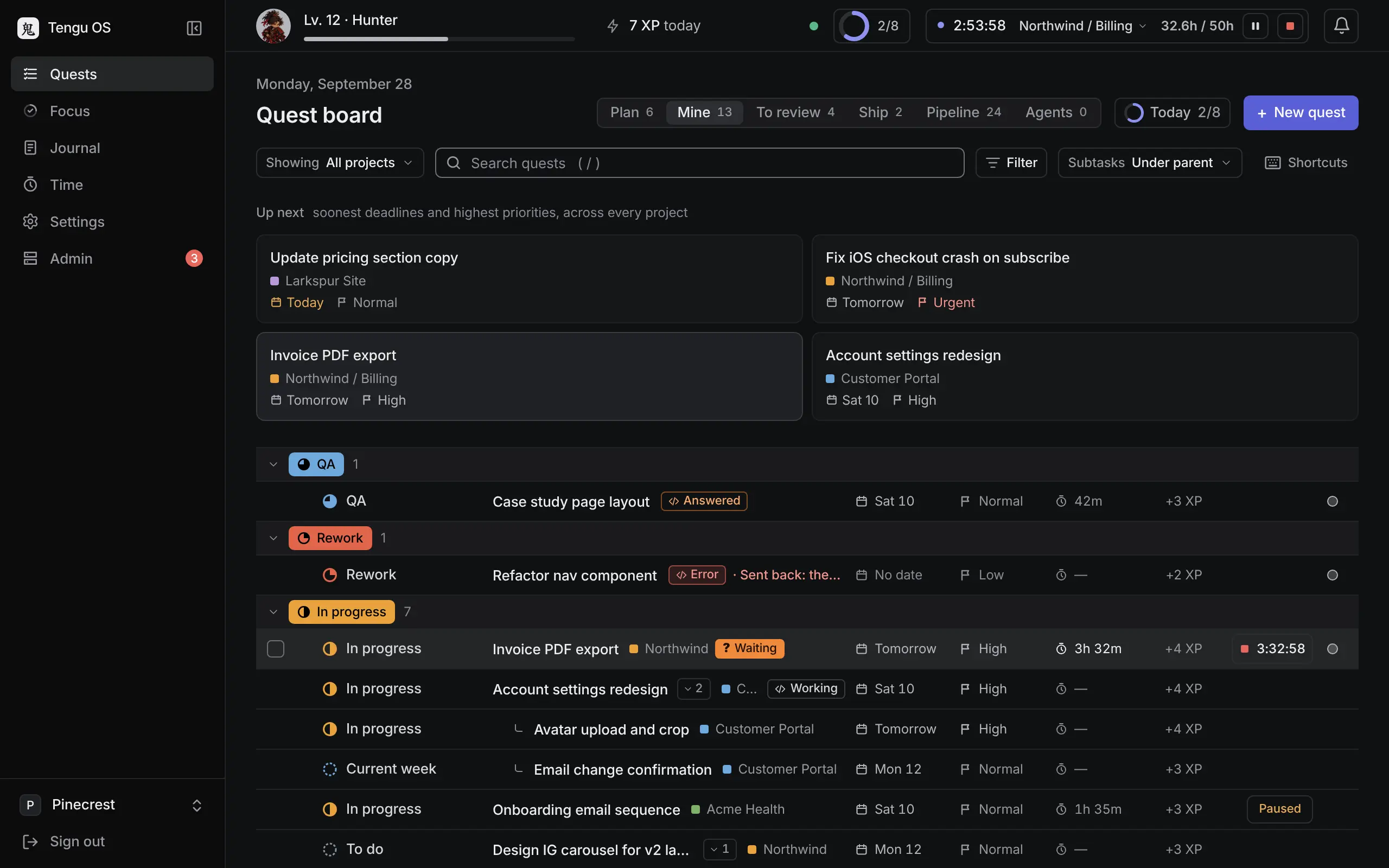
Plenty of tools can hand a ticket to a coding agent. Tengu runs the loop around it: the routine, the pull request, the QA pass, the merge and the release notes, and it moves the quest to live when the deploy lands, all on the quest your team already works from.
- Step 1
Ticket
A quest with the description, subtasks and files the work needs, whoever picks it up: a person or an agent.
- Step 2
Claude Code
Run in Claude Code fires your team's routine on your own Claude account, with the quest as the brief.
- Step 3
Pull request
Tengu's GitHub App puts the PR on the quest. Its comments thread there, and the status moves on its own.
- Step 4
QA run
A QA run tests the preview and posts findings with screenshots. Your QA person passes it or sends it back.
- Step 5
Merge
Passed quests wait on the Ship tab. Merge the PR from there, into your base branch, never production.
- Step 6
Release notes
Ship opens the release PR with the notes already written from what went in.
- Step 7
Live
The deploy lands and the quest moves to live. Nobody has to move it by hand.
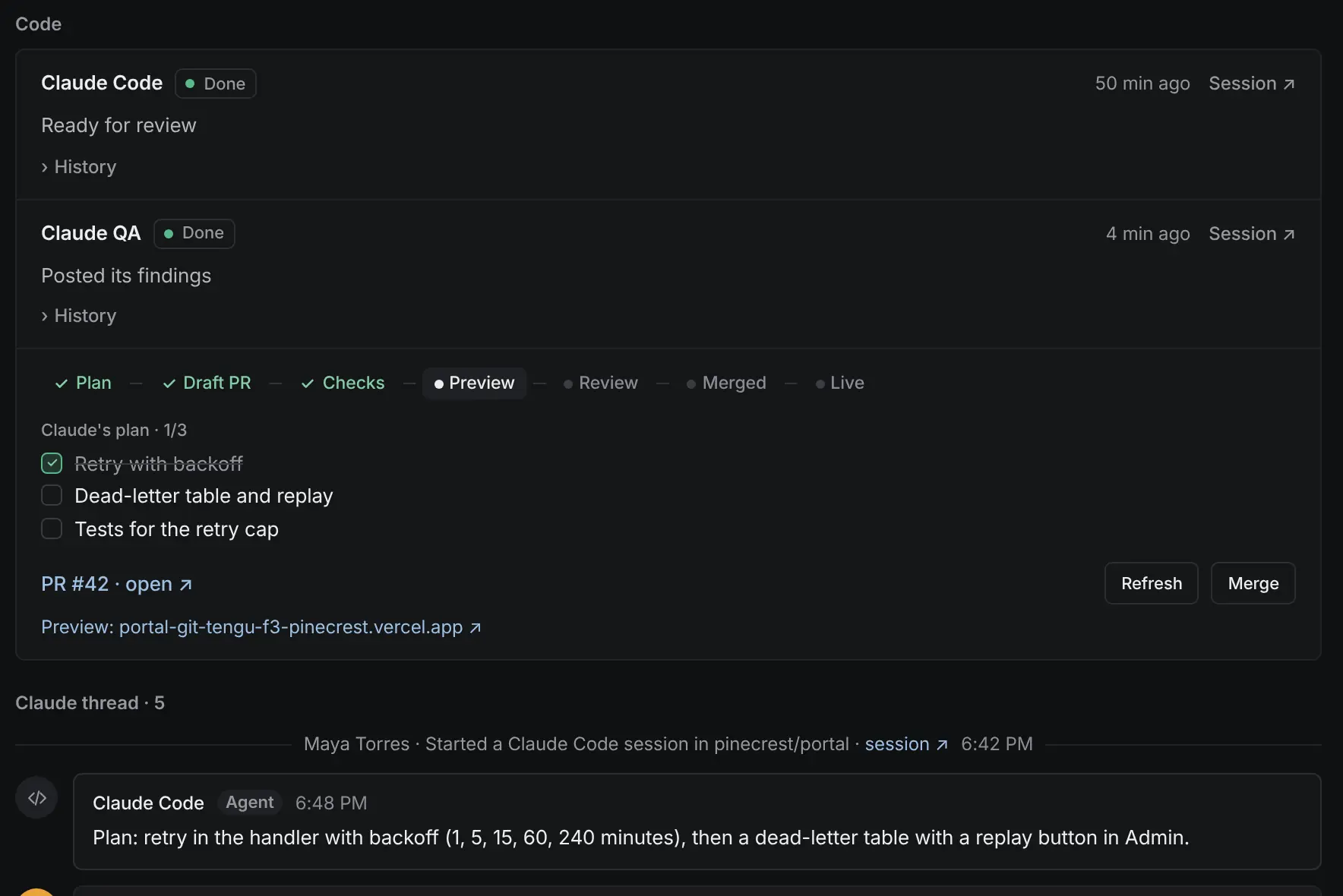
People pass it, merge it and ship it.
An agent’s pull request is a first draft. People pass it, merge it and ship it from the board; Tengu never merges into production. Every run draws on your own Claude plan, not on Tengu.
- Link the repo once. Every quest has Run in Claude Code.
- Pass or send back from one review queue, with a reason every time.
- Ship from the board with notes already written.
Two looks
Plain when you want it. Ink and amber when you don't.
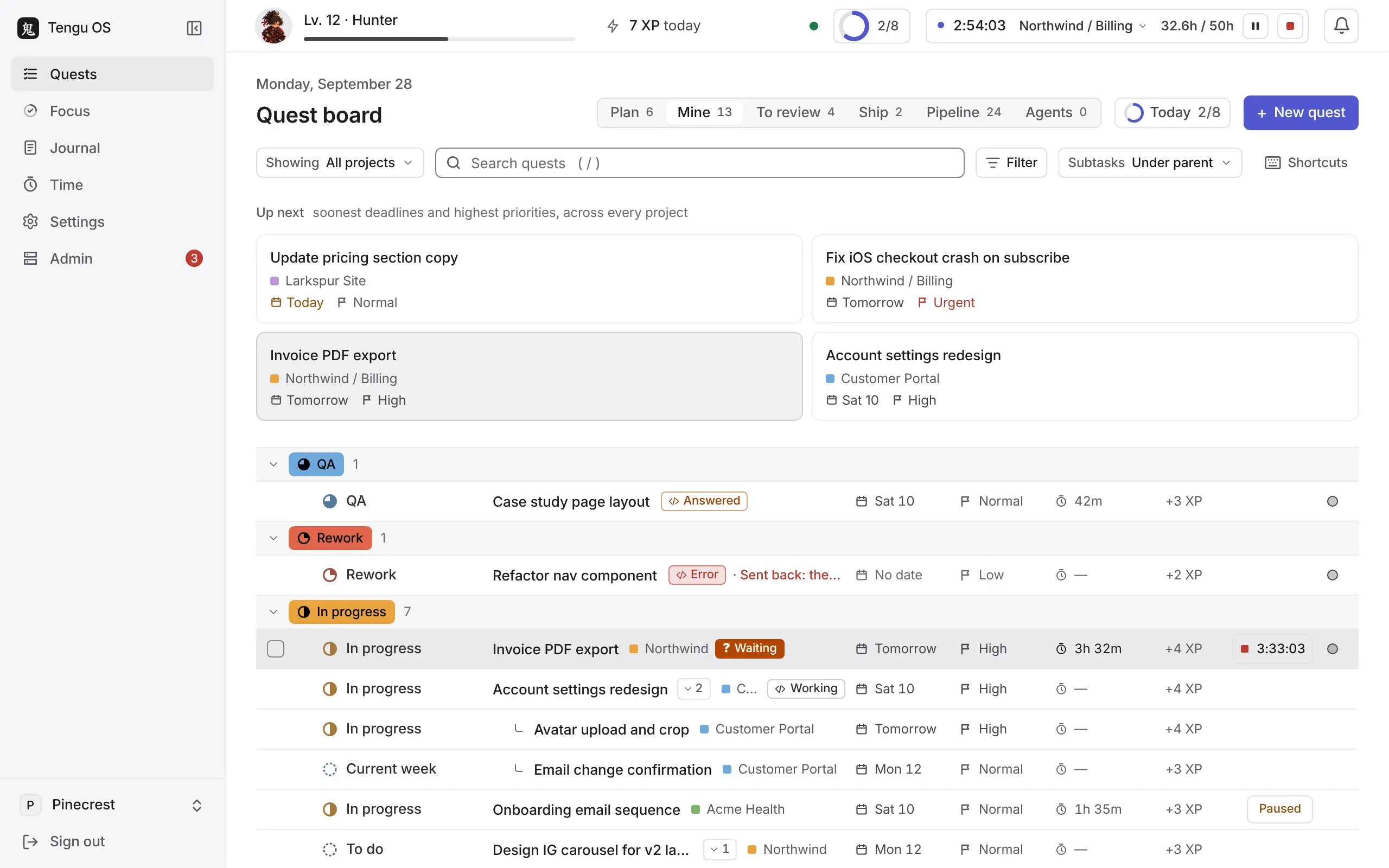
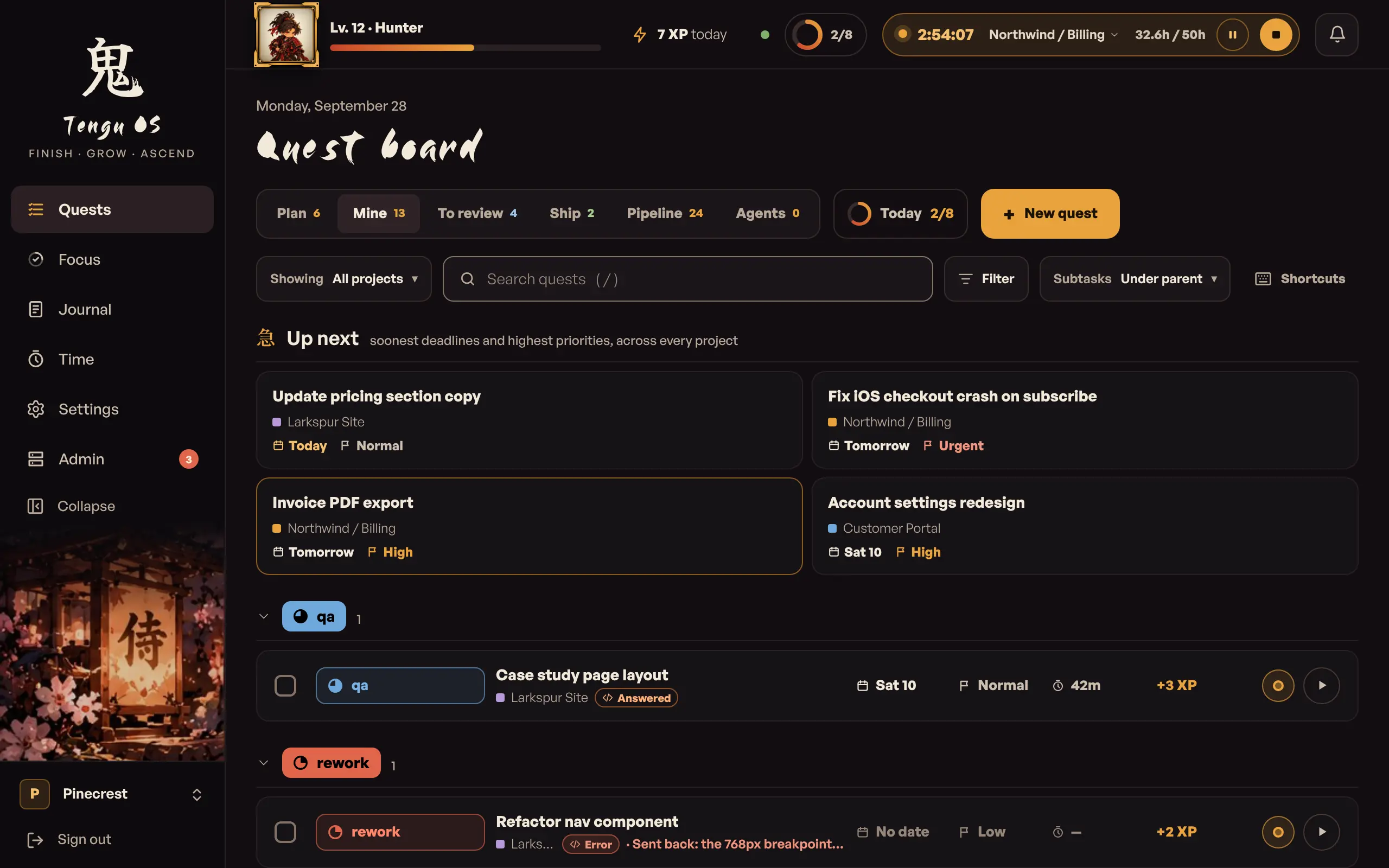
Sleek is quiet and dense, in light or dark or as your computer is. Tengu is the dark original, with its own themes and shades. Each person picks a look in Settings, or keeps the company's.
Quiet and dense: neutral greys, one indigo accent, Inter, hairlines.
What it fixes
Where software delivery leaks, and the fix for each
These nine problems come up again and again when we talk to delivery teams. Each answer below is in the product today.
Statuses are never right
Status is one keystroke, and agents move it for you.
The status menu is one key away, and a PR opening, merging and deploying moves the quest for you.
Tickets parked in progress
Parking a ticket earns nothing. Finishing it does.
Untouched quests fog over after a few days; bounties put XP on the ones nobody takes.
Tickets missing requirements
Find the unclear tickets before they blow the deadline.
A one-tap clarity rating at every handoff; quest-givers earn XP when their tickets ship on time.
QA stalls
One queue, two buttons, a reason every time, and a QA run that attaches screenshots.
The To review queue with Pass and Send back; Claude QA runs on the PR's preview.
Agents need babysitting
Link the repo once. Every quest has Run in Claude Code.
Your routine, Tengu's GitHub App and the PR thread, all on the quest.
Releases are a scramble
Ship from the board with notes already written.
Merge, Ready and Ship on the board; the release PR arrives with its notes.
Hubstaff cost and resentment
Cancel Hubstaff. Keep timesheets and payroll. Lose the screenshots.
A timer per quest, timesheets by pay period and payroll export.
No margin visibility
Know which client loses you money before the invoice.
The Capacity Hub flags a client that is losing money, now or by month-end, or has no rate, and compares each month with the last.
Contractors feel invisible
The work gets seen. The people don't get watched.
Ascensions and team moments in everyone's inbox; no online or idle status, ever.
Move without rebuilding
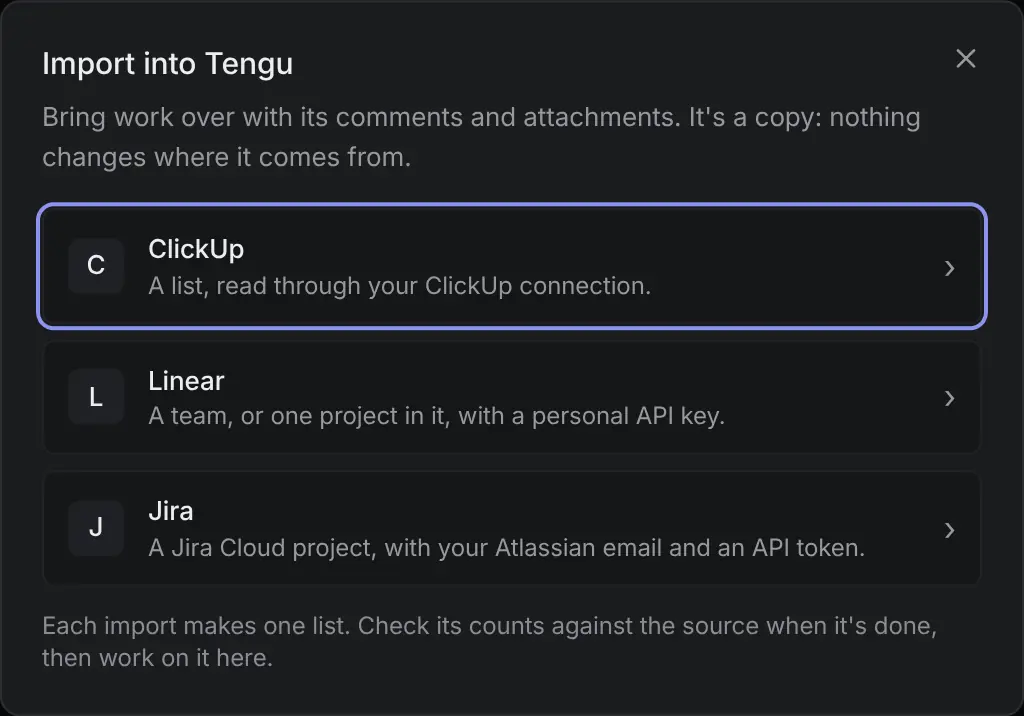
Bring a list over. Check the counts. Move when you're ready.
You don't have to rebuild anything. Import a ClickUp list, a Linear team or a Jira project with its tasks, comments and attachments, check the counts, and move the team when it's ready.
Tasks, comments and attachments
Subtasks, assignees and comments come along. Attachments, and files pasted into descriptions and comments, are copied into Tengu from ClickUp, Linear and Jira, up to 25 MB each; bigger ones stay links to the source.
Statuses that mean something
ClickUp lists keep their statuses, colours and order, and an admin gives each a role once. Linear and Jira statuses go to the matching step of the list's flow. The review queue and the dev loop work from day one.
Picks up where it stopped
Close the tab and it keeps going. Running it again updates quests instead of duplicating them.
Counts you can check
When it finishes, Tengu shows the source's count per status beside its own, and lists anything that didn't come, with the reason.
The importers come with every plan, Free included. They only read: no task, comment or file is changed in ClickUp, Linear or Jira.
Time without surveillance
Timesheets tied to the work. No screenshots.
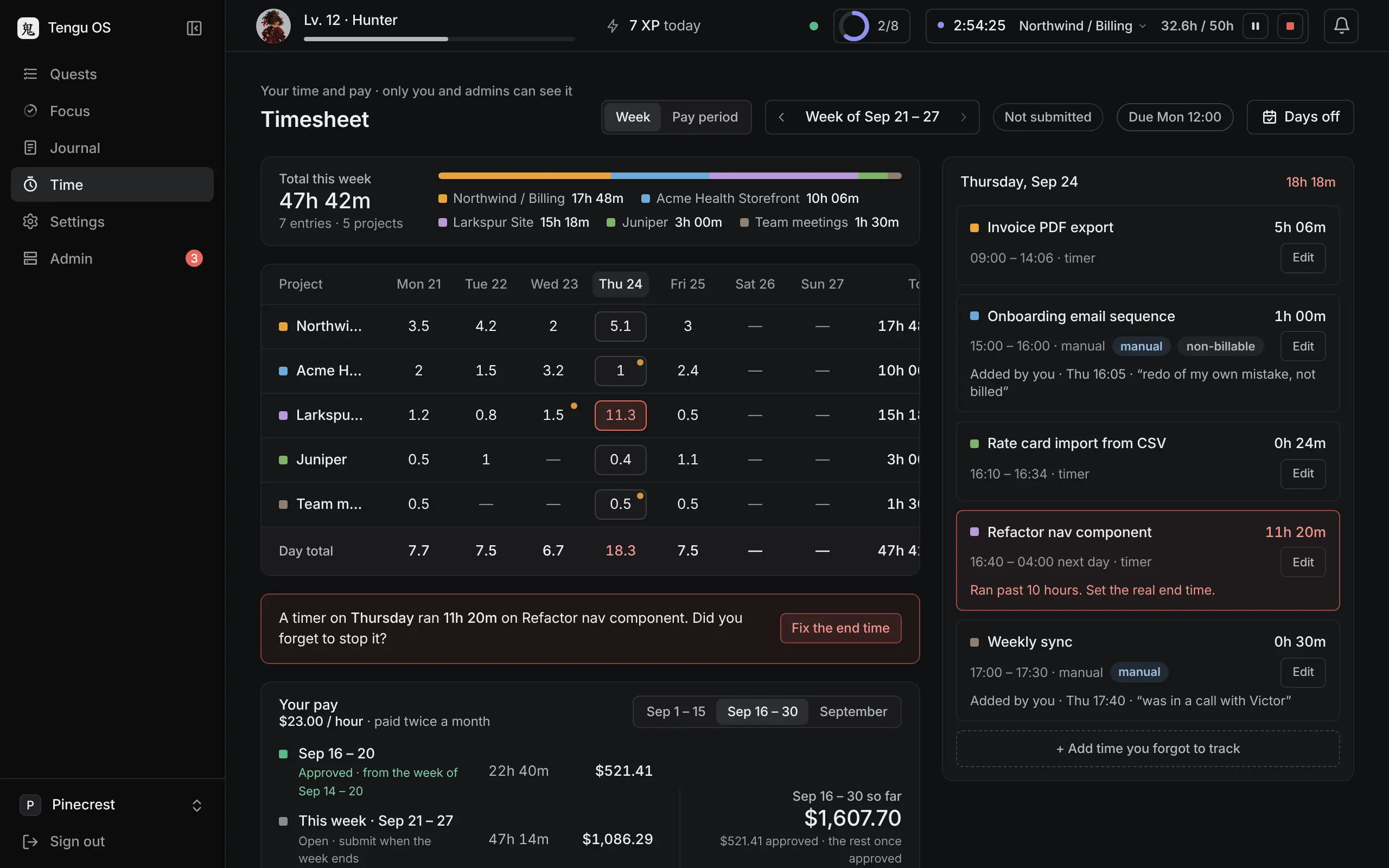
Time sits on the work it was spent on, so every hour has its quest behind it, whether it bills a client or counts against your own budget. Members see their own hours and pay, and nobody else's. Rates, salaries, costs and margins stay with your owners and admins, and out of the alerts and emails Tengu sends about time, budgets and pay.
A timer per quest
Kept on the server, so closing a tab or a laptop loses nothing. Forgotten timers get caught at the evening sweep.
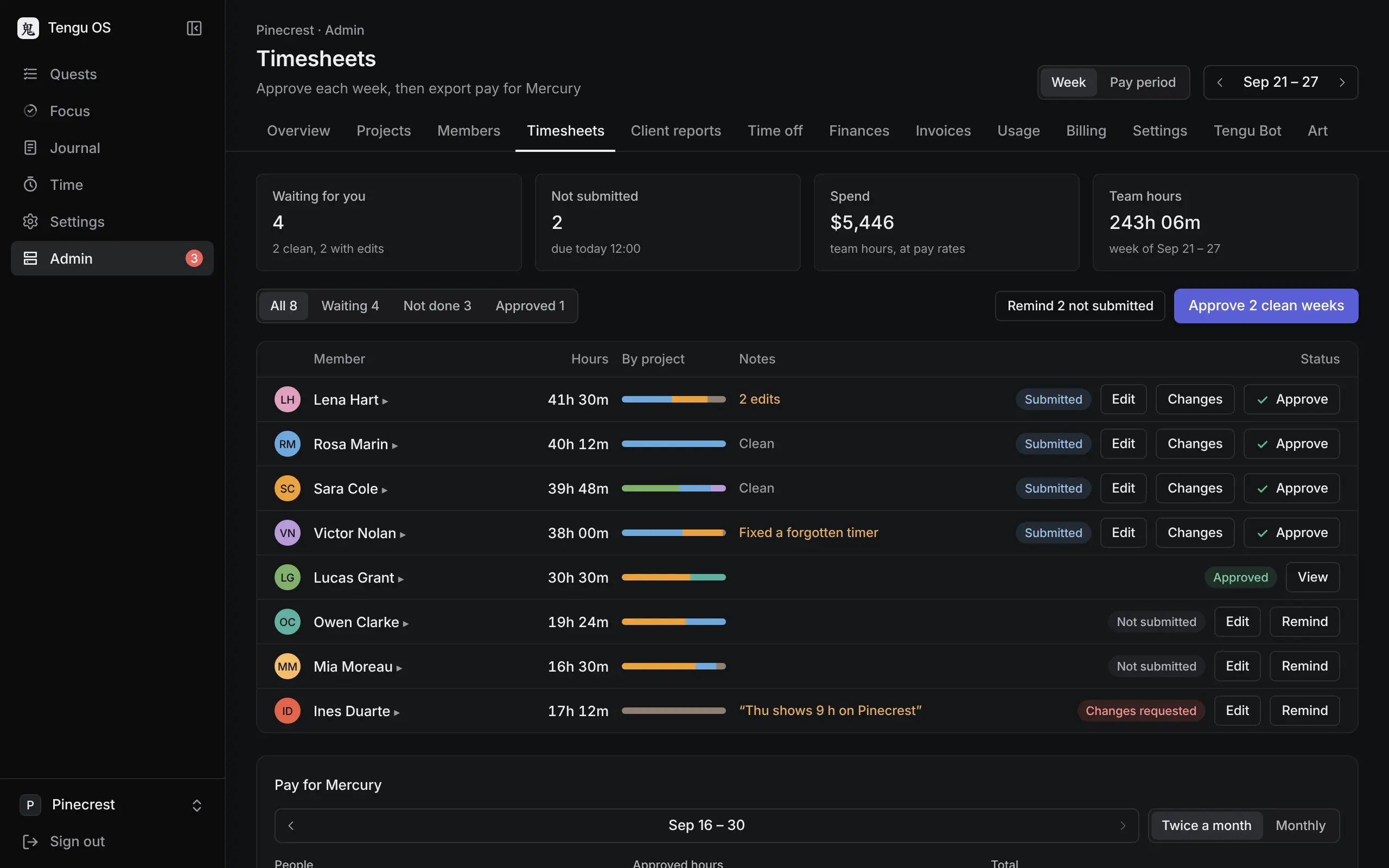
Timesheets by pay period, approved
Members fix and submit each pay period; an admin approves it, or asks for changes with a note. Paid periods are final.
Days off, approved
Members ask for days off from their timesheet, with a note if they like. Someone in Operations or an admin approves or declines, and the member hears either way. Company holidays, set by an owner or admin, show on every timesheet, and anyone can still track time on one.
Pay periods and payroll export
Periods of 1–15 and 16–end, or monthly. Export approved time per pay period as a CSV, ready to pay: hourly people with their pay, salaried people with their hours.
Budgets that pause timers
At 100% of a project budget, timers on it stop and the message names who to talk to. A budget counts hours, billable dollars or cost, so internal projects get one too. An admin extends it in one click.
Budget alerts with no dollars
Owners and admins get budget alerts as Slack DMs, and a Monday brief: budgets past 75%, 90% and 100%, timesheets waiting and who has days off this week. Percentages, dates, counts and names only; dollars stay on the page.
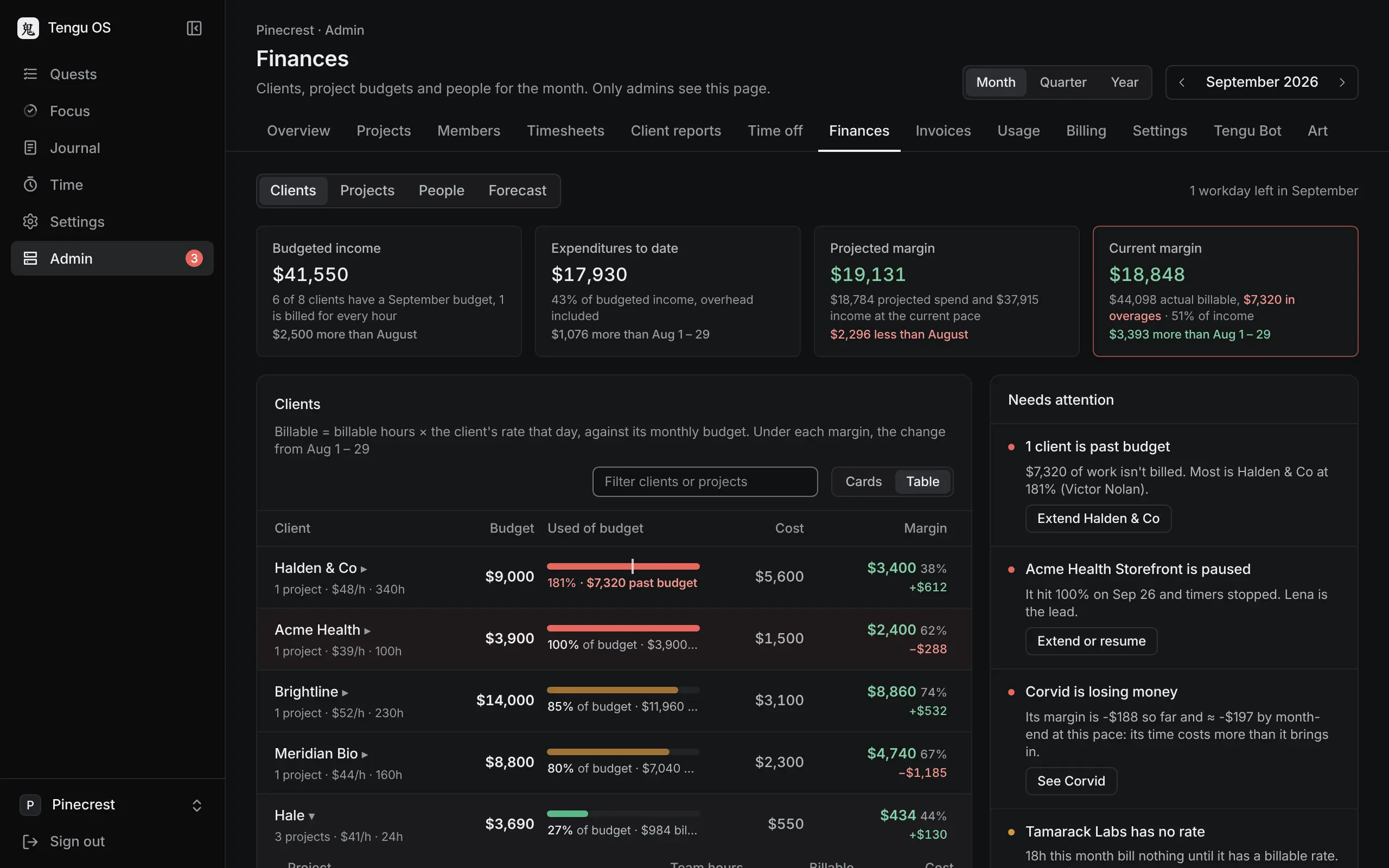
Know which client loses money
The Capacity Hub flags a client losing money, now or by month-end, and one with no rate. A client billed for every hour, with no cap, needs no budget and isn't flagged for one.
Forecasts and utilization
On the Capacity Hub, owners and admins see the change from last month on the tiles and rows, a quarter or the year to date, and billable utilization per person and for the team. Set a coming month's budgets now, and try a what-if that changes no real numbers.
Never in Tengu
- Screenshots
- Keystroke or idle tracking
- Online or away status
- XP for hours
Time, pay and budgets come with Studio. Days off come with them.
Tengu Bot in Slack
Work the board from Slack
Tengu Bot is Tengu's own Slack app. Mention it or type /tengu, and it works on the same quests your team sees on the board.
Quests from a thread
BoardMention @Tengu Bot in a thread and it becomes a quest in the right list, with the thread linked.
Answers from the board
BoardAsk who has a quest or what is waiting on QA, and it answers from the board with links.
Link previews
BoardPaste a quest link and Slack shows its status, who has it and when it is due.
Meeting recaps
StudioIt joins the call, writes the recap and proposes tickets you keep or drop.
Videos into tickets
StudioShare a screen recording of a bug and get a quest with the steps to reproduce.
Once people link their Slack account, the bot acts as them. Nobody earns XP for quests the bot creates. To install it, sign in to Tengu and choose Add to Slack in Admin › Tengu Bot.
Tengu Bot uses AI models (Anthropic’s Claude and Google’s Gemini) to read messages and draft tickets, answers and meeting minutes. On Today, the same models draft replies to Slack threads that you can change before you send them. AI can get things wrong: check what it drafts before you rely on it. Tengu never uses Slack data to train AI models.
Tengu Bot for Slack: what it does and what it keepsThe hunter
A small reward for shipped work
Each member has a hunter in a small frame at the top of the board. It levels up only when a quest is finished, and its big moments reach the team's inbox. Turn the hunter off for your whole team with one switch, or let each person hide it.
- XP comes only from finished quests. Hours never count.
- Members never see each other's pay, and see each other's time only on a meeting they host.
- The morning scroll and done sounds switch off in Settings.
- With the hunter off, the board works exactly the same and XP keeps counting.
Flame
A red scarf and a katana, embers at the heels. Rushes in and cuts twice.
- Flame Strike
- Ember Dash
- Inferno Blossom
- Raging Spirit
Seven stances, each hunter at the Hunter rank. Hover or tap one to meet it.
Pricing
Per seat, no minimum
Per seat, paid upfront. Client guests are free and agents are never a seat. No minimum.
- $0up to 5 peopleThe board and the dev loop for small studios and product teams.
Free
- $7per seat / month, annualReviews, the inbox and Tengu Bot for teams that run delivery here.
Board
- $12per seat / month, annualTickets, time and money in one place.
Studio
Replaces your time tracker
Questions
What agencies and product teams ask first
My clients need proof of hours.
We can't leave ClickUp.
Linear plus Claude Code already does this.
Another tool?
We're an in-house product team, not an agency.
The anime is unprofessional.
What if Anthropic or ClickUp changes the rules?
You're an agency too. Why would we give a competitor our rates?

Start
Bring one list. Watch the loop run.
Book a 20-minute walkthrough on your own tickets, or join the waitlist and we will write when your workspace is ready.
Book a 20-minute walkthrough